
Priority lanes
Keep an epic’s child issues grouped by priority while you set the order within each priority by hand.
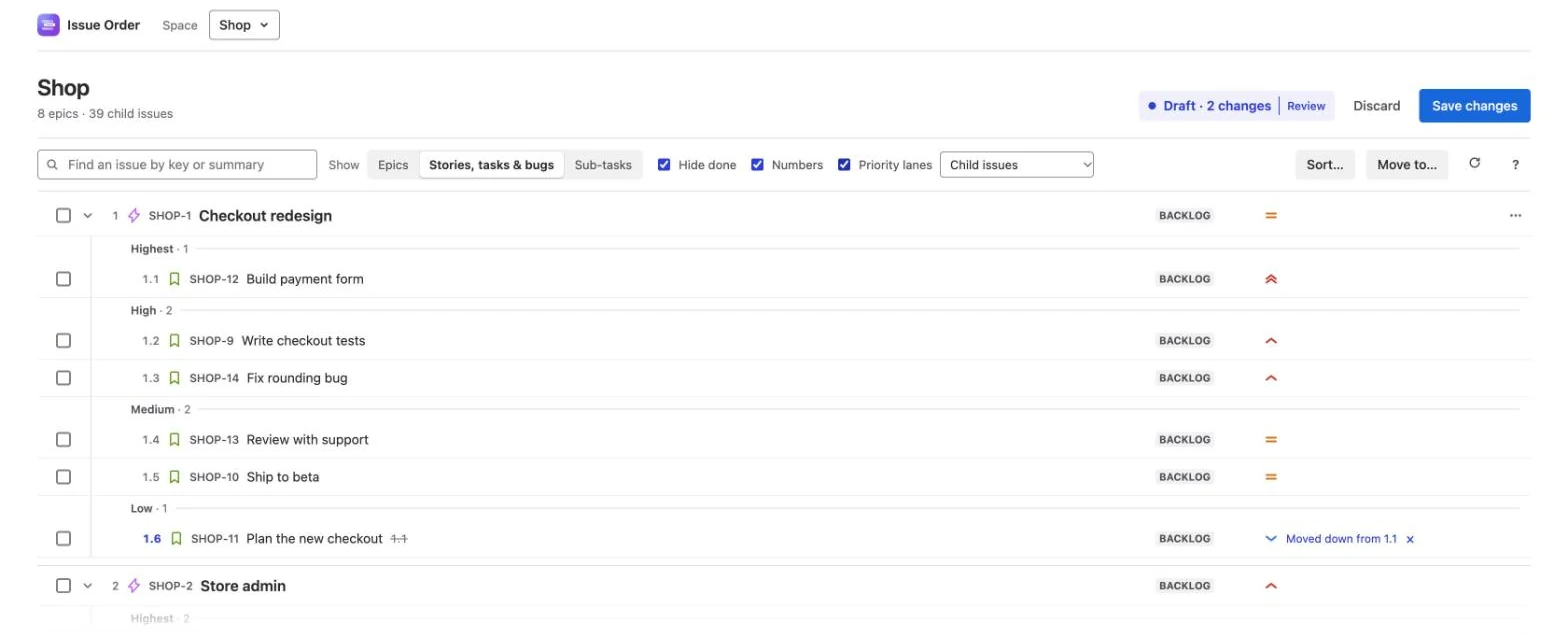
Priority lanes put a list in priority order, grouped into lanes, and keep it that way while you order it by hand. You want an epic’s child issues most important first, but in your own order within each priority. Turn lanes on and the lists inside epics are put in lanes at once, as part of your draft.
The lane headings are shown in Issue Order for Jira only; Jira never sees them. When you save, Jira gets the new order (Rank) and any priority you changed, so boards and backlogs follow. Turn lanes off before you save and the lists go back to the order you had.
Turn lanes on
Lanes are off each time you open the app. Tick Priority lanes in the toolbar, after Hide done and Numbers. The same switch is in the Reorder child issues pop-up.
- Ticking it puts lists in lanes, as one change in your draft. On the Apps page, in a space with epics, a choice appears beside the switch:
- Child issues (the default): the lists inside epics, so each epic’s child issues and each issue’s sub-tasks. The order of the epics themselves is left alone.
- Child issues and epics: every list, so the epics, Without an epic and Under epics in other spaces too. Going back to Child issues takes the epics back out: Epics taken out of lanes: back to the order you had.
- Each list is sorted by priority, most important first, keeping your order within each priority. The status line says how many issues moved: n issues put in their priority lanes. Not saved yet: Save changes writes it to Jira, and turning lanes off takes it back. Lists you open later, by unfolding an epic or changing Show, are put in lanes as they appear, quietly: they don’t take your next undo. A list loaded only for Find or a Sort preview isn’t touched until you open it.
- Each list once per time you turn lanes on. If you Discard, undo or × a list’s lane moves, they aren’t redone; that list shows its count and Put in lanes instead.
- Unticking it takes the lane moves back for every list you haven’t changed since: Taken out of lanes: back to the order you had. Anything you changed after turning lanes on stays in your draft.
- Some lists aren’t put in lanes: lists in a space where you can’t reorder, lists past 1,000 issues, a list you’ve just sorted or restored (your choice stands), and child lists of a done epic hidden by Hide done. They show their count instead. An issue you moved into a list keeps the place you gave it.
- It waits while unsaved changes from before are on offer, while a save or refresh runs (the switch is greyed out then), and if Jira’s priority order couldn’t be read (turning lanes off and on tries again). In that case lanes show Jira’s default priorities (Highest to Lowest) but no list is rearranged.
- With lanes on, How it works (the ? button) adds a short note about them.
When a list shows lanes
Every list that lanes cover has its own lanes. With Child issues, that is each epic’s child issues and each issue’s sub-tasks. With Child issues and epics, it is also the epics, Without an epic and Under epics in other spaces. In the pop-up and in a space without epics, it is every list. A list gets lane headings, such as High · 2 (the priority, then how many issues it holds), only when all three are true:
- It mixes priorities. A list where every issue has the same priority looks like a plain list.
- It’s already in priority order, most important first.
- It shows at least 5 issues. In a shorter list the headings would be as tall as the issues. The priority icons still show.
Issues hidden by Hide done, and new issues waiting in Not placed yet, don’t count. Issues with no priority go in a last lane, No priority.
A list out of priority order
Turning lanes on puts lists in priority order, so you’ll mostly see this on a list you can’t reorder, a list past 1,000 issues, or one whose lane moves you discarded or undid. A list that mixes priorities but isn’t in priority order gets no headings, because a Medium heading over High and Low issues would say nothing true. It gets a count instead, with a Put in lanes link beside it:
- on an epic’s row, for its child issues: n of m issues out of priority order
- on an issue’s row, for its sub-tasks: n of m sub-tasks out of priority order
- on the Without an epic heading, and in the header for the top list (the epics with Child issues and epics, the issues in a space without epics, or in the pop-up the issue’s own list): n of m out of priority order
The epics and Without an epic get lanes, and so a count, only with Child issues and epics picked.
A row shows its count while the row is open. Short lists get a count too: three sub-tasks can be out of order.
How issues are counted. The app finds the longest run of issues already in priority order and counts the rest: the fewest issues that would have to move. When it could go either way, the issue further down is the one counted, as in an important issue buried under less important ones.
Out-of-order issues aren’t highlighted. To fix one on its own, choose Move into its priority lane from its ••• menu; only out-of-order issues have it. The issue moves the shortest way: up to the end of its own lane if it’s more important than the lane it sits in, or down to the start of its own lane if it’s less important.
Put in lanes
Put in lanes does for one list what turning lanes on does for all of them. It moves every issue in the list into its priority’s lane, most important first, and keeps your order within each lane. On a row, its tooltip says so: Move every issue in this list into its priority’s lane, keeping your order within each lane. Nothing changes in Jira until you save.
- It sorts only the issues you can see. Issues hidden by Hide done and issues in Not placed yet keep their places. Untick Hide done afterwards and the list may count as out of order again.
- It’s part of your draft. Each moved row is marked, with its own ×, and ⌘ Z (Ctrl Z) undoes the whole step.
- It doesn’t work on lists past 1,000 issues. The app says Lists with more than 1,000 issues can’t be put in lanes here.
Once the list is in priority order, its headings appear, as long as it shows at least 5 issues. It does much what Sort by Priority, Highest first does, for one list, leaving new issues alone.
Drag into another lane to change priority
In a list with lane headings, an issue you drop into another lane takes that lane’s priority. The label beside the pointer says so before you let go: · becomes High. Drop on a lane’s heading to put the issue at the top of that lane.
The row then shows its new priority icon and the note Priority Low → High, and the priority counts as a change in your draft. The × on the row undoes the move and the priority together. Issues you drag in from another epic take the lane’s priority too.
- Only lanes with headings change priority. In a list without headings (too short, or out of order), a drop only changes the order. Move to… and the keyboard moves never change priority.
- The No priority lane doesn’t clear a priority. An issue dropped there just moves.
- Changing a priority needs the Edit issues permission in the issue’s space. Reordering needs it too, so without it the app won’t move the issue at all; see the admin guide. If Jira turns down a priority when you save, the row says Priority not changed: with Jira’s reason, and the change stays in your draft.
When you save, each new priority is written to Jira as you, along with the order and any parent changes. Review and save covers the save.
New issues: Not placed yet
With lanes on, new issues in a list wait at its top, under Not placed yet · n and the hint new since you last ordered this list. They’re listed most important first, then oldest first, with no number. In Jira they already have a place in the list; the app holds them here until you decide.
| Place by priority | Each new issue goes to the end of its own lane, in your draft. Pressing Enter on the row does the same. |
| Keep where they are | The row goes away and nothing moves. The issues show at the place Jira gave them. |
| Drag one into place | That issue leaves Not placed yet and lands where you drop it. |
- What counts as new. The first time lanes show you a list, everything already in it counts as placed, so the row starts empty. After that, an issue created since then, or since you last chose Keep where they are, waits here.
- Done issues never wait here, and nor do issues you moved into the list in your draft.
- It’s yours alone. The app keeps it per person, site and list in this browser’s storage: a time and issue keys, nothing else. Teammates have their own. In another browser, or after you clear site data, each list starts again with nothing waiting.
- Placing and keeping are remembered at once. If you then discard your draft, the issues go back to Jira’s order but don’t come back here.
Which priority comes first
Lanes follow your site’s own priorities, in the order your Jira site lists them, most important first. Priorities you added or renamed are used as they are. If the order can’t be read, the app uses Jira’s defaults, Highest, High, Medium, Low and Lowest, and issues with any other priority go under No priority. Sort by Priority uses the same order.